BitBuff
A viewer-driven training and entertainment RPG extension for Twitch streams
BitBuff is a Twitch extension that turns viewer interactions into live activity challenges for streamers. Viewers spend Bits or use free redeems to trigger exercises, while the streamer earns stats, levels, and achievements during the broadcast.
The goal was to create a system that:
- gives streamers new monetization opportunities
- creates interactive entertainment loops for viewers
- helps smaller channels build stronger audience relationships
The extension combines game mechanics, monetization design, and real-time streaming interaction into a single system.
User Problem
Twitch streamers face two structural problems:
1. Limited monetization paths
Most small and mid-size channels rely on:
- subscriptions
- donations
- occasional Bits usage
These methods are passive. Viewers give money, but they do not necessarily feel involved in the content.
2. Audience engagement plateau
Viewer engagement often drops when streams become passive experiences. Chat interaction alone does not sustain engagement for long sessions.
Streamers frequently struggle with:
- maintaining energy
- generating special content moments
- involving viewers directly in the stream
Opportunity
Interactive extensions provide a way to turn viewers into active participants rather than spectators.
However, most Twitch extensions fall into one of two categories:
- cosmetic overlays
- one-off interaction gimmicks
They rarely create persistent systems that evolve across streams. Existing fitness or training-style extensions tend to be extremely limited: one has roughly a dozen exercises, all basic weightlifting, with no way to grow or tailor the library. They often use bright, fixed colors that can’t be changed and offer little or no customization to match a streamer’s channel. That limits both aesthetics and versatility—streamers can’t shape the experience to fit their content or the direction they want for their channel.
The opportunity was to design an interaction loop that:
- generates continuous entertainment
- encourages repeat spending
- strengthens viewer-streamer interaction
- gives streamers real control over training options, theming, and how the extension complements their content
- Rewards long-term play with deep job progression and achievement systems
Product Vision
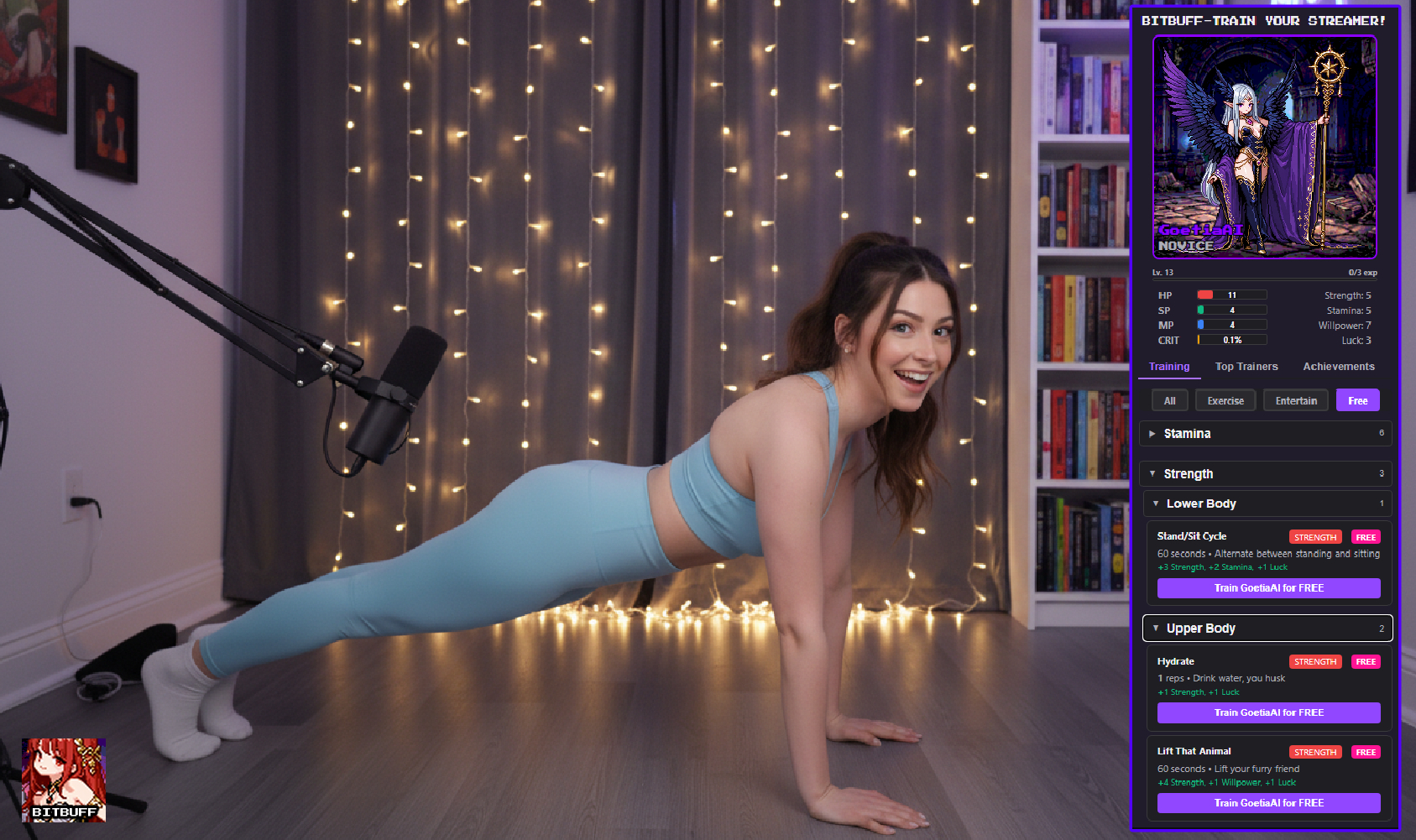
BitBuff treats the streamer as a live RPG character. Viewers can spend Bits to trigger training activities that increase the streamer’s attributes. Strength, stamina, willpower, and luck increase through gameplay mechanics, producing immediate, visible progress across streams.
Example attributes:
- Strength → increases HP
- Stamina → increases SP
- Willpower → increases MP
- Luck → increases crit chance
These attributes are calculated dynamically using stat formulas in the extension system. This design creates:
- a persistent progression loop
- visible rewards for participation
- an endless supply of interactive moments
My Role
- Product design
- UX design
- UX writing
- Frontend development
- Interaction design
- System design
- Backend architecture
This project was designed and built independently. My background working inside Twitch gave me additional insight into:
- extension limitations
- monetization patterns
- viewer interaction behavior
- gaps in the existing monetization ecosystem
Prior Internal Exploration
Before leaving Twitch, I proposed a concept to spark the creation of first-party extensions. My thinking was around specifically increasing Bits spending and improving viewer engagement through gameplay loops. The idea was to provide streamers with:
- structured viewer participation systems that are simple to understand and use
- repeatable spending loops that are rewarding, not draining
- persistent stream mechanics that are easy to configure and manage
The proposal to create first-party extensions—at ALL—was not pursued internally. BitBuff became a way to independently explore the concept and demonstrate its potential. This was partially because I needed this system myself as a small streamer seeking ways to further engage my audience and increase my Bits revenue.
An additional benefit to developing BitBuff as a solo project was that I could rapidly iterate and test the system without the constraints of a larger team or approval process. What took a week to conceptualize and fully implement on my own would have taken a year or more to produce at Twitch. If I worked on BitBuff internally, I would have earned a paltry salary (tens of hours strictly committed to the project overall) and had others take majority creator credit for my work and ideas. Bear in mind I was seated as a UX Writer, not specifically as a UX Designer, as this statement is not intended to be a slight on the work of others at Twitch and only to emphasize that I would have had a limited area of responsibility even as a project lead. Would they have even let me lead my own project once the teams tasked with trying to make Twitch profitable caught wind of it? Probably not. I used to work in games and know exactly how that works out for everyone involved.
I would have had to deal with the pressure of working on a product that was mine but not my own. I would not have had complete control over the project or the ability to overrule stakeholder decisions that I could see as a detriment to the product or the company. BitBuff could have been feature-starved and possibly abandoned if the team felt it was not worth the development time and effort, which I witnessed happen to other products internally.
Ultimately, as a reward for the difficulty and time investment of developing this myself, I will receive the 20% of Bits developer revenue earned through the extension across all users on the entire Twitch platform over its lifetime. This is, perhaps, the most significant gain to developing this myself: it will benefit me directly as both a streamer and as a developer.
UX Goals
Three core goals guided the experience design.
1. Streamer control
Streamers must be able to customize the experience easily. They need control over:
- which training options appear
- difficulty levels (reps, time)
- Bits pricing
- alert behavior
2. Viewer clarity
Viewers should instantly understand:
- what they are buying
- what will happen on stream
- how it affects the streamer
3. Continuous interaction
The system should generate content moments without requiring constant planning from the streamer.
- training options always available when live
- ongoing leaderboard and achievement progression
- viewers could effectively "reward" or "punish" the streamer at will
Designing the Training System
The extension includes a library of training options categorized by:
- exercise - training focused on health & fitness
- entertain - training designed to be funny, engaging, or interesting
- free - training that is always free to use on BitBuff
Each training includes metadata such as: category, stat gains, repetition counts, viewer cost. The UI groups training options into collapsible categories to prevent overwhelming the streamer during configuration. The UI also keeps the channel panel interface compact so a large amount of information and options remain available in an extremely limited space on both web and mobile views for viewers. This structure allows:
- quick scanning
- selective enabling
- scalable expansion as the library grows
Streamer Configuration UX
Streamers configure the extension through a dashboard that includes:
Training controls
Each training option has adjustable settings: enable/disable toggle, rep count, Bits price slider. Prices map to Twitch Bits SKUs, which represent predefined transaction tiers. The pricing slider ensures that streamers remain within valid Bits purchasing increments.
Organization
Training is grouped by category and type to reduce cognitive load. This prevents large training libraries from becoming difficult to manage.
Customization
Streamers can customize several presentation elements.
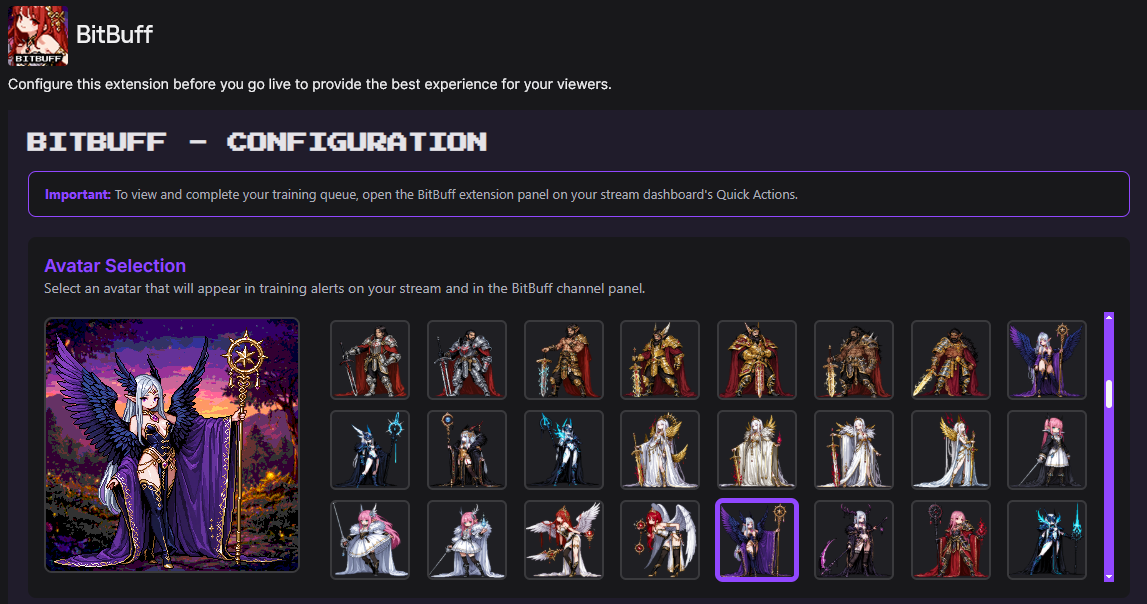
- Avatar selection — The extension dynamically loads available avatar assets and allows the streamer to preview them before selection.
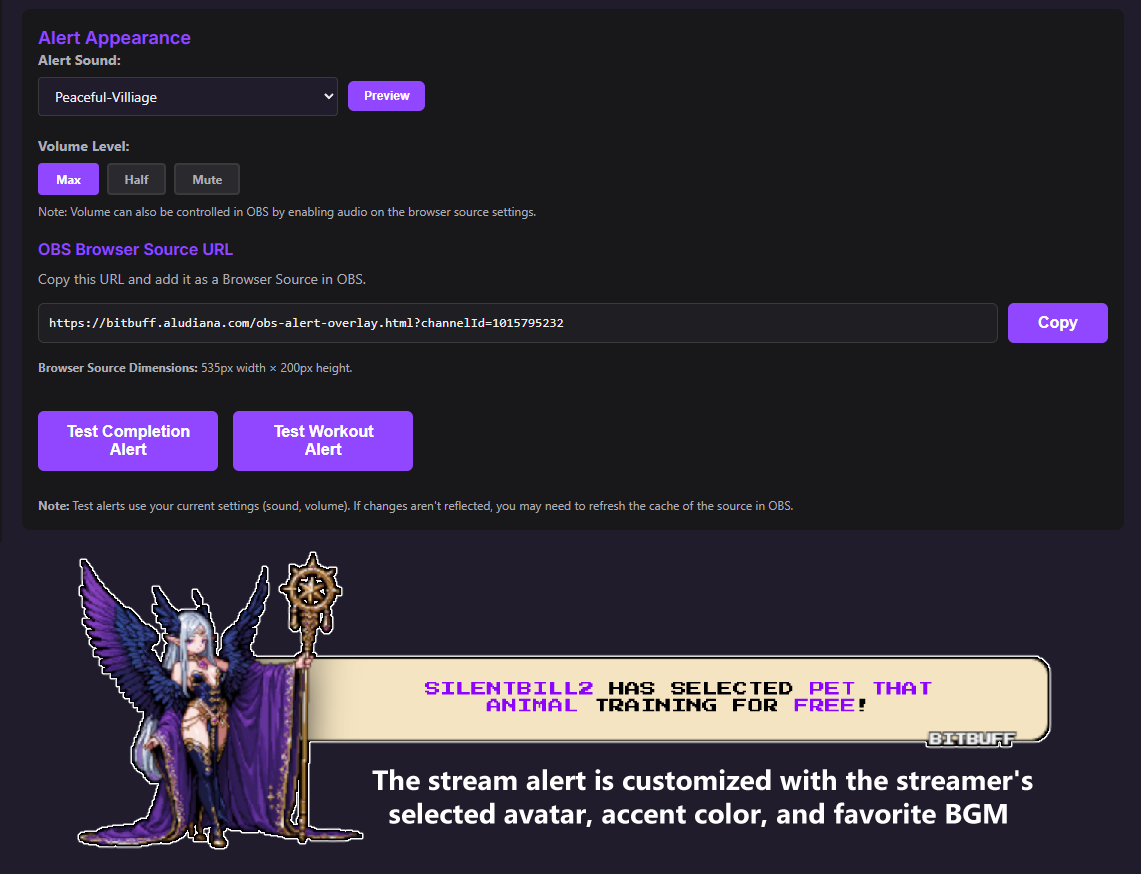
- Alert configuration — Alerts can be customized with sound selection and volume control. Streamers place the OBS browser source wherever they want in their scene so alerts fit naturally into the broadcast layout.
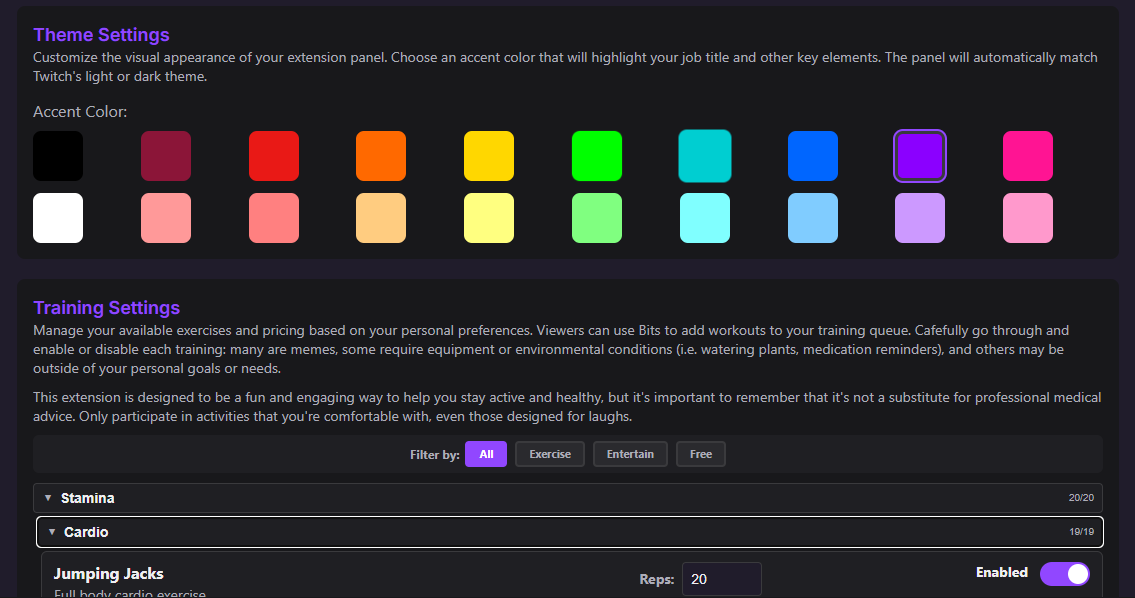
- Accent color themes — Saturated and pastel palettes let streamers match the extension to their channel. The accent system is designed for both light and dark Twitch themes: when the chosen color would have low contrast on the active theme, the extension applies an outline so it stays readable.
Avatar selection and dashboard
Streamers choose from over 200 avatars to represent their on-stream character. The library includes a wide variety of options—different genders, races (including fantasy and furry-style avatars), body builds, weapons, and overall themes so streamers can match the extension to their channel and taste. Avatar assets are by BKX1 on itch.io, used under commercial license. The selected avatar appears in the extension channel panel next to the streamer’s stats and is used directly in the stream alert when viewers add training, so both the panel and the OBS overlay stay visually consistent.
Stream alert customization and OBS integration
Stream alerts use a browser source overlay: the extension generates a unique URL with the streamer’s channel ID so alerts can appear directly in OBS without extra tools. Streamers customize the alert in config, and the chosen avatar and accent color are used on the alert itself: text elements adopt the accent color, and the streamer's avatar appears in the RPG-style alert bubble. Alert music and sound effects match the extension's theme; music is by HydroGene on itch.io (CC0). Volume can be adjusted in the config, but for live streams it's better controlled in the OBS browser source settings. Test buttons in config let streamers fire a sample alert while offline so they can position the overlay in OBS and set alert volume before going live.
Accent colors and per-training controls
Streamers choose an accent theme and control exactly which trainings are available and at what Bits price. Each training can be toggled on or off; rep counts and Bits pricing are adjustable and stay within predefined tiers. The accent color system detects the viewer's Twitch theme (light or dark) and, when the selected accent would be hard to see on that theme, applies a contrasting outline to accent-colored text elements so the UI remains clear in either context.
Twitch Environment Considerations
Designing inside Twitch extensions presents several constraints.
Sandbox limitations
Extensions run inside sandboxed iframes. Standard browser features such as native confirm dialogs are blocked. To solve this, custom modal components were built to replicate confirmation behavior.
Theme compatibility
Twitch supports both light and dark themes. The extension dynamically detects the user's theme and applies the correct interface styling automatically; the accent color system uses the same detection to keep UI readable in either theme (see Accent colors and per-training controls).
Content scope and platform rules
The scope of BitBuff is designed so streamers can lean into activities that might otherwise brush against ToS—including more “spicy” or adult-coded content—without crossing the line. Trainings are framed in neutral, non-explicit terms: squats are an exercise, not something lewd, and fitnesswear is permitted for workouts; redeems like “Cheers!” use “your favorite beverage” so the streamer can choose water, alcohol, or any legal substance they’re allowed to consume on stream.
The training copy never promotes alcohol or other restricted behavior; it offers an alternative to “hydrate” (drink water) in intentionally open-ended language. Streamers remain responsible for complying with ToS. BitBuff avoids specific violation language (e.g. “promoting drinking alcohol for donations”) by keeping training names and descriptions neutral, so the extension supports a wide range of content directions without putting the streamer in a bad spot.
Terminology and taxonomy
I was well aware of how Bits spending must be treated on the Twitch platform—even the word “spend” for Bits is restricted because it implies a purchase. The extension uses “train” instead of “pay” and other neutral language for Bits redeems so it stays within platform expectations.
I also worked hard to emphasize that although BitBuff is designed to help keep streamers a bit more active and aware of their health while streaming, it is not a "workout" extension and should not be marketed as such. The vast majority of training is focused on fun and mental health benefits, not physical fitness. Many free redeems will let viewers help remind the streamer about important breaks to hydrate and care for their arms, hands, and wrists during long play sessions.
One of the funnier taxonomy challenges that I called right off the bat was the "Bit" in "BitBuff." The entire extension is built with a 16-bit gaming aesthetic, and it's not called "BuffBits" or similar. Twitch really should have known better than to flag the name as potentially using their IP, since they have no ownership over the term "bit," but they did it anyway. "Bits" is used in every other context on the platform, which I know as the literal ONE person who created their style guide and maintained terminology for the org, so it should have been clear that the name was not intended to be a direct rip-off of Twitch's branding. I challenged them with my counter to clarify things for the reviewer, and they accepted BitBuff's name on resubmission.
Gameplay System
BitBuff uses a lightweight RPG framework to create persistent progression. The stats, attribute, and experience systems are designed so that every completed training gives immediate, noticeable gains—but reaching higher levels and continued stat growth requires an increasing amount of training over time, so progression stays rewarding at the start and remains meaningful long term.
Stats and attributes
Base stats (Strength, Stamina, Willpower, Luck) increase when the streamer completes exercises. Attributes are derived from those stats: HP from Strength (every 5 Strength = +1 HP, plus +1 more per 10 Strength), SP from Stamina (every 5 Stamina = +1 SP), MP from Willpower (every 5 Willpower = +1 MP, plus +1 more per 10 Willpower). Crit rate comes from Luck (2.5 Luck = 0.1% crit rate). A bonus Luck value is added from stat milestones (+1 per 10 Strength, +2 per 10 Stamina, +1 per 10 Willpower). Attribute bars scale dynamically so when one bar reaches full, all bars scale proportionally. Full conversion details are on bitbuff.aludiana.com.
Experience and leveling
Experience equals the base stat points earned from completing workouts (Luck bonus does not count). Each level requires progressively more experience; the system uses a polynomial growth curve so higher levels stay achievable without exponential grind. Early levels come quickly so streamers see progress right away; later levels require more dedication, so level-ups continue to feel meaningful. The design keeps the loop satisfying in the short term and sustainable over many streams.
Engagement Loop
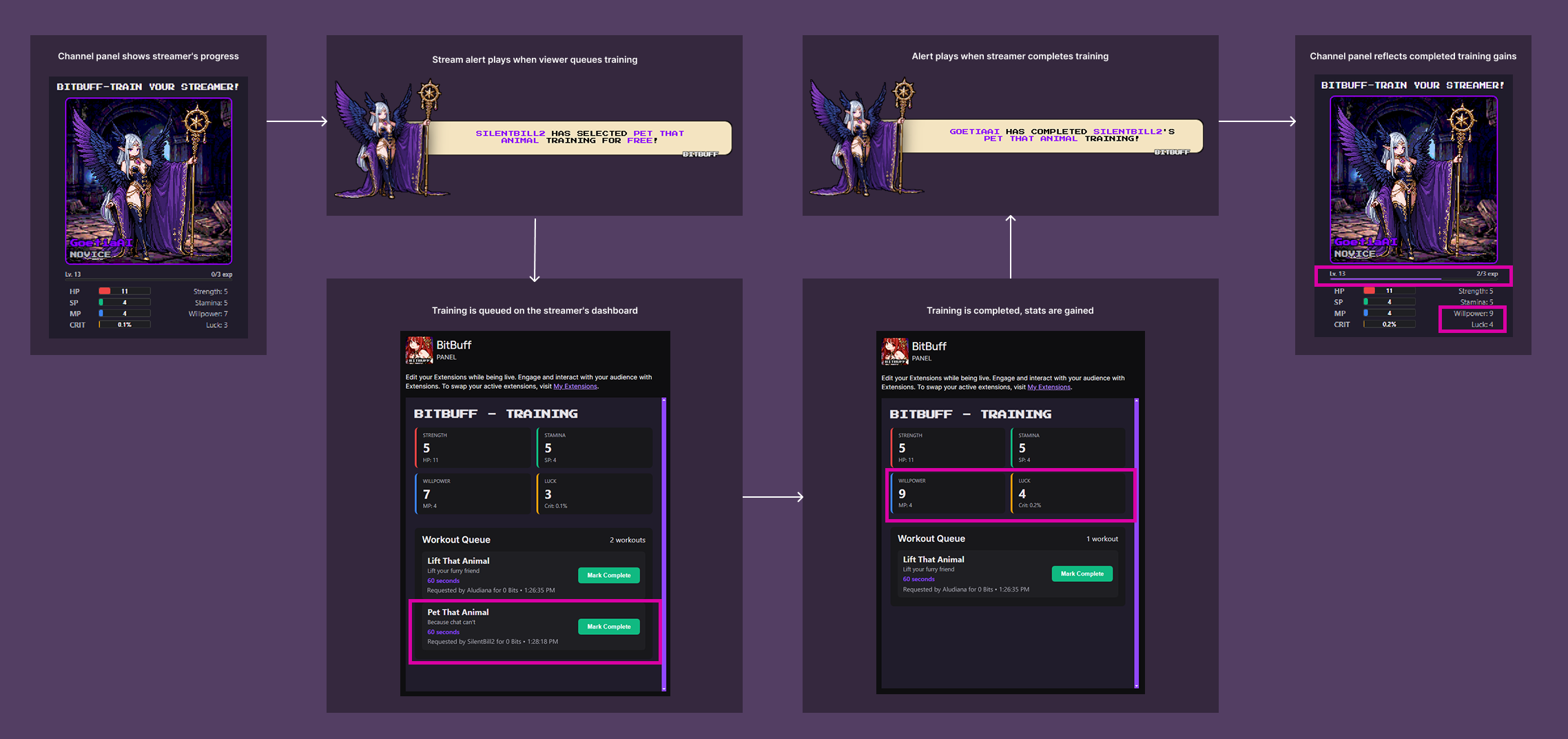
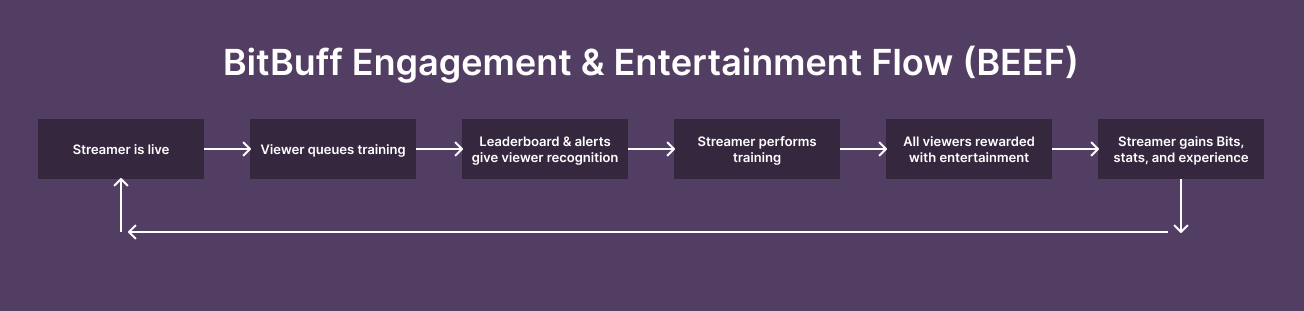
The interaction loop works like this:
- Viewer adds a training (Bits or free redeem)
- Exercise alert appears
- Streamer performs the challenge
- Stats increase
- Progress becomes visible
This loop creates three reinforcing behaviors: viewer participation, streamer performance, and game progression. Together they produce a stream that feels interactive and evolving rather than static.
BitBuff Engagement & Entertainment Flow (BEEF)
The flow creates a natural endless loop for viewers and streamers alike, providing benefits to both with every interaction over time.
Design Challenges
Avoiding configuration fatigue
A large exercise library could overwhelm streamers. Grouping exercises and using collapsible sections reduced visual complexity.
Preventing accidental configuration loss
Streamers may modify many settings during setup. A change detection system tracks unsaved changes and warns users before leaving the page.
Handling Twitch extension limitations
Sandbox restrictions required building custom UI components for actions normally handled by browser dialogs.
Impact
BitBuff introduces a new type of interaction model for Twitch streams. Instead of passive tipping, viewers:
- influence the content directly
- participate in gameplay mechanics
- contribute to streamer progression
- compete with each other for leaderboard positions (tracked weekly, monthly, and overall)
This produces:
- more frequent Bits usage
- stronger viewer investment
- repeat engagement across streams
- a sense of community and competition
Leaderboards and spending work differently here than with traditional tipping or other extensions. Donation leaderboards often carry stigma—viewers are seen as competitive “simps” or “whales.” With BitBuff, the spend is framed as good fun: the outcome is a training that can be beneficial, funny, or straight-up trolling depending on how the streamer has set up their content. Because streamers choose which trainings are enabled and how they’re positioned, they control what the leaderboard and Bits usage mean for their channel. The same redeem can be fitness on one stream and lighthearted chaos on another.
Measured Results
Early feedback from streamers who activated BitBuff points to stronger engagement and monetization in a short window. Here are a few reports from three small-to-medium streamers (under 50 average viewers) who have been using the extension for several weeks.
Streamer A
Just Chatting and variety streamer, 15–25 average viewers. Streamer A said Bits usage increased noticeably within the first two weeks; they had rarely seen Bits before and now get a few redeems per stream. They described the content as “more fun for me and chat:” viewers stay longer to see trainings complete and to push for the next level. They’ve noticed more returning chatters and a couple of new regulars who specifically mention the extension.
Streamer B
Fitness and IRL streamer, 20–35 average viewers. Streamer B reported that overall earnings from the channel went up, with Bits making up a larger share than before. They said the loop gives them a clear reason to take short movement breaks, preferring to queue up several trainings at once so they can perform them all in a row during gameplay breaks, and that viewers have started coordinating “workout” moments together to flood the queue when it's time for training. They’ve seen better growth in follow count and returning viewers in the month since activating, and chat is more active around training queues and completions.
Streamer C
Creative and cozy gaming streamer, 8–15 average viewers. Streamer C said the extension made their stream feel more interactive without needing to plan segments: viewers drive the pacing. Bits revenue is still modest but has increased from near zero; they value the repeat engagement more, with several lurkers turning into chatters when trainings fire. They described feeling less pressure to “perform” and more like they’re doing something with the community.
Reflection
BitBuff demonstrates how interactive systems can create stronger relationships between streamers and viewers. By combining monetization, gameplay mechanics, and UX design, the extension transforms a simple transaction into a shared experience.
For me, the project was also an opportunity to explore an idea I had previously proposed internally: that Twitch monetization could evolve beyond passive benevolent tipping and toward interactive entertainment systems that reward both creators and their communities.